
Net profit
Shows what remains after food cost, labour cost and other operating costs are deducted from sales.
This Restaurant KPI Calculator helps restaurants, cafés, bars and food & beverage teams calculate key performance metrics including labour cost percentage, food cost percentage, prime cost, net profit, average spend and sales per labour hour.
Use this KPI calculator in any currency. Enter your own sales, costs, covers, labour hours and operating assumptions for the same period — daily, weekly or monthly.
Use daily, weekly or monthly figures. Just keep the same period across all fields.
Results update automatically as you type.
This Restaurant KPI Calculator helps restaurant operators review the core numbers that affect profitability and day-to-day performance. It combines sales, food cost, labour cost, other operating costs, covers, labour hours, trading days and seating capacity into practical hospitality KPIs.
The goal is not just to produce numbers. The goal is to help managers understand whether the business is operating efficiently, whether labour and food cost are under control and whether the venue is generating enough profit after key operating costs.
Shows what remains after food cost, labour cost and other operating costs are deducted from sales.
Shows how much revenue is consumed by the two biggest controllable costs in hospitality.
Shows how efficiently scheduled labour hours are turning into revenue.
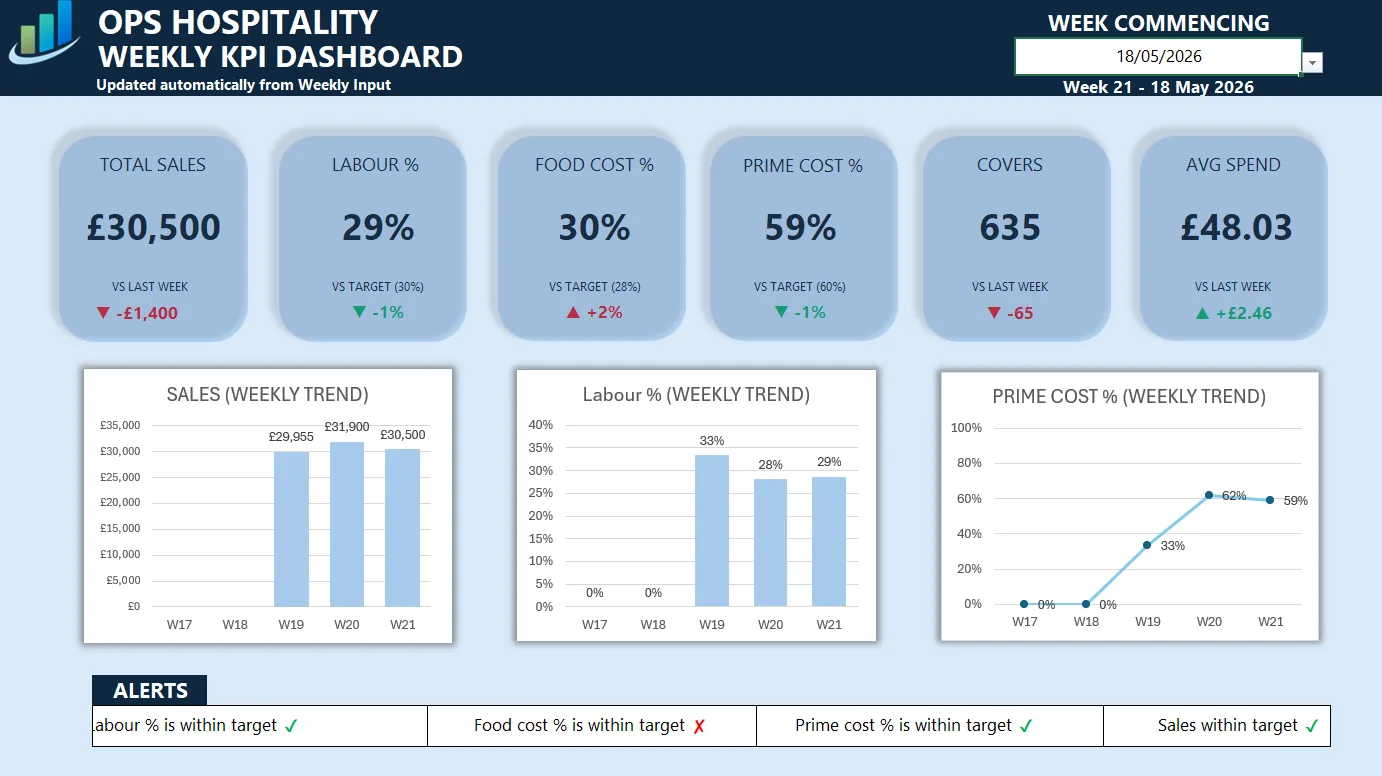
The calculator is useful for a quick KPI check. Use the Weekly KPI Dashboard when you want a structured Excel workflow for weekly sales, labour cost, food cost, prime cost, targets and performance trends.
View KPI DashboardEnter values for the same trading period. For example, use one week of sales with the same week of food cost, labour cost, covers and labour hours. Mixing weekly sales with monthly labour cost will create misleading results.
For a deeper explanation of the metrics, read the Restaurant KPI Guide.
Food Cost Percentage: Food Cost ÷ Total Sales × 100
Labour Cost Percentage: Labour Cost ÷ Total Sales × 100
Prime Cost Percentage: (Food Cost + Labour Cost) ÷ Total Sales × 100
Net Profit: Total Sales − Food Cost − Labour Cost − Other Operating Costs
Average Spend Per Customer: Total Sales ÷ Covers
Sales Per Labour Hour: Total Sales ÷ Total Labour Hours
These numbers should be reviewed together. A strong sales week can still produce weak profitability if prime cost is too high or operating costs are not controlled.
KPI targets vary by concept, pricing, location and service model, but broad ranges can help managers understand whether the numbers need attention.
To understand these targets in more detail, read the Prime Cost Guide, Labour Cost Guide and Food Cost Guide.
It tracks net profit, net profit percentage, food cost percentage, labour cost percentage, prime cost percentage, gross profit, average spend, sales per labour hour, daily sales average and sales per seat.
You can use either. The important rule is to keep every input from the same period, such as one week or one month.
Prime cost is food cost plus labour cost. The calculator shows prime cost as a percentage of total sales.
No. It is an operational planning tool designed to help managers understand performance quickly. Formal accounting reports should still be used for financial reporting.
Use the Restaurant KPI Calculator alongside focused tools for labour, food cost, break-even planning and cash margin analysis.
To understand how much cash is left after key operating costs, read Cash Margin in Hospitality.
After calculating individual restaurant KPIs, use the Restaurant Profitability Score Calculator to turn profitability, cost pressure and payment coverage into a simple health check.
For weekly reporting, use the Weekly KPI Dashboard to track targets, trends and management notes in Excel.